RTK GNSS on Linux with the u-blox ZED-F9P — From 5 Metres to 1 Centimetre
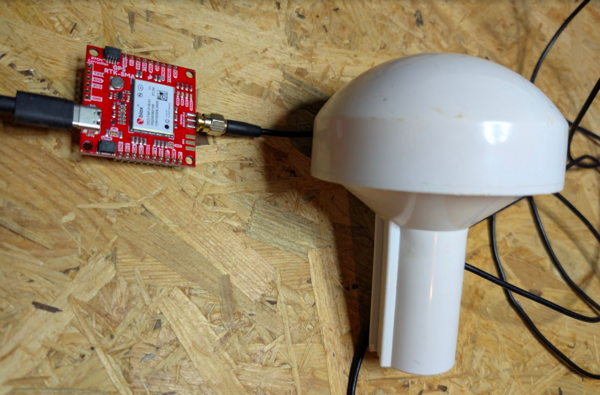
Standard GPS gives you roughly 2 to 5 metres of position accuracy on a good day. Real-Time Kinematic positioning — RTK — gives you around 1 centimetre. That is a 200× to 500× improvement, achieved entirely in software and signal processing, with the same satellites overhead. No magic, no proprietary black box. Just a cleverer way of reading the signal that has been reaching your antenna all along.
This post walks through exactly how RTK works, why the math holds together, and how to get a u-blox ZED-F9P receiver on a Linux machine from zero to RTK Fixed — with free correction data from the German SAPOS network. Every concept is explained before any command is typed.
How Standard GNSS Works
Each GNSS satellite broadcasts a continuous radio signal containing two things: a precise timestamp from an atomic clock, and the satellite’s orbital position at the time of transmission. Your receiver picks up signals from several satellites simultaneously, measures how long each signal took to arrive, multiplies by the speed of light, and triangulates. Four satellites give you three spatial dimensions plus a clock correction; more satellites improve the geometry and reduce noise.
The timing measurement works through a technique called code phase ranging. Each satellite modulates its carrier signal with a pseudorandom noise (PRN) sequence — a pattern of ones and zeros unique to each satellite. Your receiver generates an identical local copy of the code and slides it in time until the two line up. The offset between the local copy and the incoming signal is the travel time. The GPS L1 C/A code runs at 1.023 MHz, so one chip (one bit in the sequence) spans about 293 metres of travel. Receivers can resolve the alignment to perhaps 1% of a chip, giving position resolution in the 1–3 metre range.
Several effects limit accuracy further:
- Ionosphere: The ionosphere is a plasma layer 60–1000 km up. Radio signals slow slightly as they pass through it, and the delay varies with solar activity, time of day, and the elevation angle of the satellite. Dual-frequency receivers (L1 + L2) can measure and compensate for most of this delay directly.
- Troposphere: The lower atmosphere adds a smaller, more predictable delay that depends on temperature, pressure, and humidity.
- Multipath: Near buildings or reflective surfaces, signals bounce off walls and arrive via multiple paths, blurring the correlation peak.
- Satellite geometry: If all visible satellites cluster in one part of the sky, your position is poorly constrained in the other direction. The metric is PDOP — position dilution of precision. Lower is better.
These effects combine to give standard single-frequency GNSS an accuracy floor of roughly 2–5 metres in open sky, worse in urban environments.
The Key Insight: Carrier Phase Measurement
Here is the thing nobody tells you when you first learn about GPS: the satellites are not just broadcasting a code on top of a carrier wave — the carrier wave itself carries information you can measure.
The GPS L1 carrier frequency is 1575.42 MHz. That corresponds to a wavelength of:
λ = c / f = 299,792,458 m/s ÷ 1,575,420,000 Hz ≈ 0.1903 m ≈ 19 cmA capable receiver can measure the phase of this carrier wave — not just which chip in the PRN code arrived, but where within a single 19 cm oscillation cycle the wave currently sits. Phase measurement precision is typically about 1% of one cycle, which translates to roughly 2 mm of distance resolution.
That is the leap: from 1–3 metre code resolution to 2 mm carrier-phase resolution. Two orders of magnitude, from the same signal.
So why does standard GPS not use this? Because of a fundamental ambiguity.
When the receiver measures a carrier phase of, say, 127.4°, that tells it where within one cycle the wave is sitting. But it has no idea how many complete cycles have elapsed over the total path from satellite to receiver. The satellite is 20,000 km away. At 19 cm per cycle, the signal travels through roughly 105,000,000 cycles on its way down. The measured phase gives you the fractional part of the last cycle. The integer number of complete cycles — called N, or the integer ambiguity — is unknown.
More precisely, the carrier phase measurement φ relates to the true range ρ like this:
φ = ρ/λ + N + εwhere N is an integer and ε captures noise and atmospheric delays. You can measure φ to millimetre precision, but N could be anywhere in a range of millions of integers. Until you know N, all that precision is useless.
Resolving N is the entire technical challenge of RTK.
How RTK Resolves the Ambiguity
RTK uses a second receiver — the reference station — at a precisely known, surveyed location. Both receivers observe the same satellites at the same time. Here is what that buys you.
The reference station knows its exact position. It knows the exact orbital position of each satellite (from the broadcast ephemeris). It can therefore compute exactly what the range ρ to each satellite must be. From that it can compute what the carrier phase measurement should be if there were no atmospheric delay, no clock errors, nothing but geometry.
In reality, the measured phase differs from the predicted phase. That difference is caused by the ionosphere, troposphere, receiver clock drift, and multipath — all the things that also affect the rover (the moving receiver you are trying to position). Crucially, for a baseline of a few tens of kilometres, these errors are nearly identical at both the reference station and the rover. The atmosphere over a 30 km patch of sky looks the same to both receivers.
So the reference station continuously computes: measured phase minus predicted phase = error. It broadcasts these corrections in real time via the RTCM protocol (Radio Technical Commission for Maritime Services, version 3 in modern use). The rover receives the RTCM corrections and subtracts them from its own measurements. Most of the atmospheric error disappears. What remains is a much cleaner phase measurement with a known relationship to the true range.
With the errors reduced, the rover’s RTK engine can now solve for N using a technique called integer least squares (the most common implementation is LAMBDA — Least-squares AMBiguity Decorrelation Adjustment). The engine generates candidate integer combinations for all tracked satellites simultaneously and tests which set is statistically consistent. When one combination is overwhelmingly more likely than all others, the receiver declares a fixed solution. N is now known for every satellite in view. The carrier phase measurements, with their 2 mm resolution, can be used directly for positioning.
The result is a position accurate to 1–2 cm horizontally and perhaps 2–3 cm vertically, continuously updated in real time.
A few points are worth emphasising:
- The correction baseline matters. As the distance between reference station and rover grows, the atmospheric conditions diverge. RTK corrections are typically valid out to 30–50 km from the reference station. Beyond that, accuracy degrades. Networks of reference stations (see Virtual Reference Stations below) extend this range.
- The fix is not instantaneous. The RTK engine must collect enough phase observations across enough epochs and satellite geometries to confidently resolve N. In good conditions this takes 10–60 seconds. In poor conditions — heavy tree cover, buildings, multipath — it may never achieve a fixed solution.
- L2 (GPS: 1227.60 MHz, wavelength ~24 cm) helps enormously. A dual-frequency receiver can form a widelane combination of L1 and L2 phases with an effective wavelength of ~86 cm, which makes the integer ambiguity far easier to resolve. This is why dual-frequency receivers like the ZED-F9P fix so much faster than older single-frequency designs.
Fix States: No Fix → Float → Fixed
RTK receivers report their solution quality through a fix type field. The ZED-F9P’s NAV-PVT message uses a fixType integer:
| fixType | Name | Typical hAcc | What it means |
|---|---|---|---|
| 0 | No Fix | — | Not enough satellites or signals |
| 1 | Dead Reckoning | — | Using IMU only, no GNSS |
| 2 | 2D Fix | >10 m | Altitude assumed, not measured |
| 3 | 3D Fix | 2–5 m | Standard GNSS, code phase only |
| 4 | GNSS + Dead Reckoning | varies | Sensor fusion |
| 5 | Time Only | — | Position known, timing mode |
| 4 (carrSoln=1) | RTK Float | 20–50 cm | Corrections received, ambiguity not yet resolved |
| 4 (carrSoln=2) | RTK Fixed | ~1 cm | Ambiguity resolved, full precision active |
In ubxtool output, the relevant fields are fixType and carrSoln:
fixType 3  carrSoln 0   → standard 3D fix
fixType 4  carrSoln 1   → RTK Float (corrections active but N not fixed)
fixType 4  carrSoln 2   → RTK Fixed (goal achieved)
The Float state is not worthless — 20–50 cm is still a significant improvement over a raw 3D fix and can be adequate for some applications. But Fixed, with its sub-centimetre precision, is what makes RTK genuinely extraordinary.
Virtual Reference Stations
A network of permanent GNSS reference stations — CORS networks — covers most of Europe and North America. Germany operates SAPOS (Satellitenpositionierungsdienst der deutschen Landesvermessung), a network of stations roughly 40–70 km apart. Sweden has SWEPOS, France has RGP, and so on.
Rather than connecting your rover to the single nearest station, modern correction networks use Virtual Reference Stations (VRS). The concept is elegant: the network server knows the precise positions of all its physical stations and continuously models the spatial variation of atmospheric errors across the region. When you send it your approximate position (a single coarse GNSS fix is sufficient), it synthesises a virtual reference station right next to you — typically within a few hundred metres. The correction data the server sends looks like it came from a real station at that virtual position, with no baseline errors to worry about.
This has a practical consequence for the software setup: the NTRIP server needs to know your current position to compute the VRS corrections. Your rover must send NMEA GGA sentences (which contain position) back to the server, not just receive from it. The stream relay tool str2str handles this with its -b flag, described in the setup steps below.
The Hardware: u-blox ZED-F9P
The ZED-F9P is u-blox’s flagship professional-grade RTK receiver. The “01B” or “01C” hardware revision suffix you see on commercial modules denotes board revisions with minor component changes; the core receiver is the same.
Key specifications:
| Property | Value |
|---|---|
| Frequencies | L1 + L2 (GPS, GLONASS, Galileo, BeiDou) |
| Constellations | GPS, GLONASS, Galileo, BeiDou, QZSS, SBAS |
| RTK accuracy | 0.01 m + 1 ppm CEP (horizontal) |
| PPS accuracy | < 20 ns RMS (with good fix) |
| Update rate | Up to 20 Hz (RTK), 25 Hz (raw) |
| Interface | USB (CDC-ACM), UART, SPI, I2C |
| Protocol | UBX (proprietary binary), NMEA, RTCM 3.3 |
On Linux, the ZED-F9P connects via USB and enumerates as a CDC-ACM device — you will see it as /dev/ttyACM0 (or ttyACM1 etc. if other ACM devices are already present). No driver installation is required; the kernel’s cdc_acm module handles it automatically.
The built-in RTK engine runs entirely on the receiver’s own processor. Your PC or Raspberry Pi does not compute the RTK solution — it merely feeds the receiver the RTCM correction stream and reads back the result. This matters for embedded applications where the host CPU is busy with other tasks.
The PPS output deserves mention: at under 20 ns RMS, it is competitive with dedicated timing receivers and far more accurate than anything derived from code-phase GNSS. For a GNSS-disciplined oscillator, this output is the primary timing reference.
The Software Stack
Three tools do all the work. Understand each one before wiring them together.
ubxtool
ubxtool is part of the gpsd-clients package. It speaks u-blox’s proprietary UBX binary protocol — the low-level message format used for configuration, status polling, and raw data. The UBX protocol sits alongside NMEA on the same serial port; the receiver outputs both simultaneously.
Key flags:
-f /dev/ttyACM0— the device to talk to-p PRESET— send a poll request for a specific message class (e.g.,NAV-PVT,RESET)-w 5— wait up to 5 seconds for a response-r— receive-only mode: print all incoming messages without sending anything
The -r flag is important when another process already owns the serial port. You cannot send commands through a TCP bridge — only read what the receiver is already outputting autonomously.
str2str
str2str is part of the RTKLIB suite, a well-established open-source library and toolset for GNSS data processing. str2str is a stream relay utility: it reads from one data source and writes to one or more destinations simultaneously, with optional bidirectional forwarding.
It understands several stream types:
serial://device:baud— serial port (note: no/dev/prefix — RTKLIB prepends it automatically on Linux)ntrip://user:pass@host:port/mountpoint— NTRIP client (downloads RTCM corrections)tcpsvr://:port— TCP server (other tools connect to this port to read the stream)tcpcli://host:port— TCP client
The -b N flag enables back-feeding: it reads NMEA sentences from output stream N and forwards them back to the input stream. This is how the rover’s position (in NMEA GGA format) reaches the NTRIP server for VRS computation.
socat
socat (SOcket CAT) is a general-purpose bidirectional byte relay. It connects two endpoints of almost any type — TCP sockets, serial ports, files, pipes, PTYs — and relays data between them.
In this setup, str2str exposes the receiver’s output on a TCP port. ubxtool only knows how to talk to serial ports. socat bridges the gap by creating a PTY (pseudo-terminal, i.e., a virtual serial port) backed by the TCP connection. ubxtool opens the PTY as if it were a real serial device.
Step-by-Step Setup
Step 0: Install dependencies
sudo apt install rtklib socat gpsd-clientsCheck that your user can access the serial device. The ZED-F9P’s CDC-ACM interface belongs to the dialout group:
ls -la /dev/ttyACM0
# crw-rw---- 1 root dialout 166, 0 May  3 10:14 /dev/ttyACM0
Check your group membership:
groups $USERIf dialout is not listed, add yourself and re-login:
sudo usermod -aG dialout $USER
# Log out and back in, or run: newgrp dialout
Step 1: Verify the receiver works
Before touching any RTK configuration, confirm the receiver is alive and producing fixes. Start with a factory reset to guarantee a known state:
ubxtool -p RESET -f /dev/ttyACM0Give it 10–15 seconds to restart, then poll the navigation fix:
ubxtool -p NAV-PVT -f /dev/ttyACM0 -w 5The NAV-PVT message is the ZED-F9P’s primary position/velocity/time output. The key fields in the response:
| Field | Meaning | Example |
|---|---|---|
fixType |
Solution type (3 = 3D fix) | 3 |
carrSoln |
Carrier solution (0=none, 1=float, 2=fixed) | 0 |
numSV |
Satellites used in solution | 14 |
lat |
Latitude × 1e7 (divide by 10,000,000 for degrees) | 525832100 → 52.5832100° |
lon |
Longitude × 1e7 | 133976400 → 13.3976400° |
hMSL |
Height above mean sea level, mm | 42310 → 42.3 m |
hAcc |
Horizontal accuracy estimate, mm | 1950 → ~2 m |
vAcc |
Vertical accuracy estimate, mm | 3100 → ~3.1 m |
If fixType returns 3 and hAcc is in the range 1000–5000 mm, the receiver is working correctly with a standard GNSS fix. Now you can add RTK.
Step 2: Get NTRIP corrections — SAPOS Brandenburg
SAPOS (Satellitenpositionierungsdienst der deutschen Landesvermessung) is Germany’s national network of GNSS reference stations, operated by the state survey offices. Brandenburg’s service covers Berlin, Brandenburg, and approximately 100 km beyond the state border — sufficient for much of northeastern Germany and parts of Poland and the Czech Republic.
Registration is free, with no service-level agreement and no usage fees:
https://geobasis-bb.de/lgb/de/geodaten/raumbezug-sapos/sapos-anmeldeformular/You register with your name and email address. Processing takes 1–2 business days. You receive a username and password by email.
Connection parameters for the VRS service:
| Parameter | Value |
|---|---|
| Server | www.sapos-bb-ntrip.de |
| Port | 2101 |
| Mountpoint | VRS_3_4G_BB |
| Protocol | NTRIP v1/v2 |
| Format | RTCM 3.3, MSM4 |
| Constellations | GPS + GLONASS + Galileo + BeiDou |
MSM4 (Multiple Signal Messages, type 4) provides pseudorange and carrier phase measurements for all tracked signals — exactly what the ZED-F9P needs for dual-frequency RTK.
For other German states: the SAPOS portal for each Bundesland provides its own mountpoints and registration. Some states (Bavaria, Baden-Württemberg) charge annual fees; Brandenburg and Berlin are free. International readers should look for their national CORS network — IGS, EUREF, UNAVCO, and similar organisations maintain lists.
Step 4: Start str2str with RTK corrections
This is the central command. It connects to SAPOS, feeds the corrections to the receiver, and simultaneously makes the receiver’s output available on a local TCP port:
str2str \
  -in  ntrip://USERNAME:PASSWORD@www.sapos-bb-ntrip.de:2101/VRS_3_4G_BB \
  -out serial://ttyACM0:38400 \
  -out tcpsvr://:9000 \
  -b 1
Replace USERNAME and PASSWORD with your SAPOS credentials.
What each flag does:
-in ntrip://... Connects to the SAPOS NTRIP caster as a client and streams RTCM 3.3 correction data. The corrections arrive continuously as long as the connection is open.
-out serial://ttyACM0:38400 Writes the incoming RTCM stream directly into the ZED-F9P’s serial port. Note the absence of /dev/ — RTKLIB on Linux prepends /dev/ automatically. If you write serial:///dev/ttyACM0, it will try to open /dev//dev/ttyACM0 and fail silently or with a confusing error. The baud rate (38400) must match the receiver’s configured UART rate; the default from factory is 38400.
-out tcpsvr://:9000 Opens a TCP server on port 9000. Any client that connects to localhost:9000 receives everything the ZED-F9P outputs — NMEA sentences, UBX frames, the works. This is the observation point for monitoring tools.
-b 1 The back-feed flag. It reads NMEA sentences from output stream 1 (the serial port, which is the first -out) and relays them back to the input stream (the NTRIP caster). The VRS server needs your rover’s NMEA GGA sentence to know your approximate position and compute the right virtual reference. Without -b 1, the server either refuses the connection or sends corrections for the wrong location.
Leave this command running. It is the active connection; killing it drops the correction stream and the ZED-F9P reverts to a standard 3D fix within seconds.
Step 5: Parallel monitoring while str2str runs
str2str now exclusively owns /dev/ttyACM0. Any other tool that tries to open that device directly will get a “device or resource busy” error. The TCP port on 9000 is the solution.
Create a virtual serial port (PTY) bridged to the TCP stream:
socat PTY,link=/tmp/gps_pty,raw,echo=0 TCP:localhost:9000 &PTY,link=/tmp/gps_pty— creates a PTY and symlinks it at/tmp/gps_ptyraw,echo=0— disables line processing and echo (essential for binary protocols)TCP:localhost:9000— connects tostr2str’s output server
Now open the virtual port with ubxtool in receive-only mode:
ubxtool -r -f /tmp/gps_pty -w 30The -r flag is critical here. You are reading through a TCP bridge; the receiver is not on the other end in the normal sense. Sending UBX commands into this pipe would confuse str2str and accomplish nothing. Use -r to listen only.
You will see a continuous stream of NAV-PVT frames (and other messages) scrolling by. Watch the fixType, carrSoln, and hAcc fields as the RTK engine works.
Step 6: Verify RTK Fixed
Filter for the most relevant fields:
ubxtool -r -f /tmp/gps_pty -w 60 2>&1 | grep -E "fixType|carrSoln|hAcc"The progression you are looking for:
fixType 3  carrSoln 0  hAcc 1950   ← standard 3D fix, ~2 m, no corrections yet
fixType 3  carrSoln 0  hAcc 1820   ← corrections received but not yet applied
fixType 4  carrSoln 1  hAcc 430    ← RTK Float: corrections active, ~0.5 m
fixType 4  carrSoln 1  hAcc 310    ← Float improving as more epochs accumulate
fixType 4  carrSoln 2  hAcc 12     ← RTK Fixed: integer ambiguity resolved, ~1 cm
In open sky with good satellite geometry (PDOP < 2.5, 12+ satellites on both L1 and L2), the ZED-F9P typically reaches Fixed within 30–90 seconds of receiving the first corrections. The dual-frequency widelane combination dramatically accelerates the integer resolution compared to older L1-only receivers.
Once Fixed, the hAcc value of 10–20 mm is not merely a statistical estimate — it reflects a true centimetre-level position measurement. The receiver’s RTK engine is now tracking carrier phase coherently across all visible satellites, and any small displacement of the antenna is immediately visible in the solution.
Why This Matters for Timing Applications
The ZED-F9P’s PPS (Pulse Per Second) output is accurate to under 20 ns RMS relative to GNSS system time, even with a standard 3D fix. For comparison, the timing jitter of a typical quartz oscillator over one second is orders of magnitude larger.
For a GNSS-disciplined oscillator project — where the PPS signal disciplines a TCXO via a DAC — two aspects of RTK are directly relevant:
First, position stability. A standard GNSS fix wanders by metres over time as satellites rise and set and atmospheric conditions change. This wandering does not directly affect the PPS timing — the receiver’s timing mode locks to the satellite clock independently of the position solution. However, a stable position solution means the receiver’s internal models (troposphere correction, satellite selection) are operating on solid ground. RTK Fixed provides a position that is stable to centimetres over hours.
Second, the disciplining loop itself. If the oscillator project ever uses position as part of its model (for instance, computing the expected Doppler from a known location), centimetre-level position accuracy eliminates one more source of modelling error.
For most disciplined-oscillator applications, the RTK Fixed state is not strictly necessary — but it is instructive to achieve it, because it proves the full signal chain is working: antenna, cable, receiver, correction stream, and software stack.
Troubleshooting
stream server start error when starting str2str Port 9000 is already in use. Either a previous str2str instance is still running, or another service has claimed the port. Check with ss -tlnp | grep 9000 and kill the occupying process, or change the port to 9001.
serial:///dev/ttyACM0 vs serial://ttyACM0 RTKLIB prepends /dev/ to serial port names on Linux. The correct form is serial://ttyACM0:38400, not serial:///dev/ttyACM0:38400. The latter produces a doubled path and either fails silently or throws a permissions error on a nonexistent path.
ubxtool returns no data when reading via the TCP/PTY bridge You need the -r flag: ubxtool -r -f /tmp/gps_pty -w 30. Without -r, ubxtool sends a poll request into the PTY, which goes nowhere useful. The receiver must be configured to output NAV-PVT autonomously (Step 3) for -r to see anything.
RTK Float never becomes Fixed Several possible causes: - Sky obstruction: Trees, buildings, or a roof directly above the antenna block L2 signals, which are weaker and more easily attenuated than L1. Move to a location with a clear view from horizon to horizon. - NTRIP connection dropped: Check str2str output — if the NTRIP stream disconnects and reconnects, the RTK engine may restart the ambiguity resolution process. A flaky internet connection causes this. - Wrong mountpoint: Some NTRIP servers have mountpoints for different constellations or message formats. Ensure VRS_3_4G_BB (or your regional equivalent) provides MSM4 or MSM7 messages for all constellations your receiver tracks. - Patience: In difficult conditions — partial sky cover, PDOP > 3 — convergence to Fixed can take 3–5 minutes or never arrive. If hAcc in Float mode has been stable at 30–50 cm for more than 5 minutes, the geometry is not good enough for a fix at this location.
Permission denied on /dev/ttyACM0 Your user is not in the dialout group. Run sudo usermod -aG dialout $USER, then log out and back in completely (closing and reopening a terminal is not enough — you need a full session restart, or run newgrp dialout in the affected shell).
The receiver does not appear at /dev/ttyACM0 after plugging in Run dmesg | tail -20 immediately after plugging in. You should see lines like cdc_acm 1-1:1.0: ttyACM0: USB ACM device. If nothing appears, try a different USB cable (the ZED-F9P requires data lines, not a charge-only cable) or a different USB port. The cdc_acm module should be present in any standard Linux kernel; confirm with lsmod | grep cdc_acm.
Written in the context of the OpenOrbitSync project — an open-hardware GNSS-disciplined TCXO using the Raspberry Pi CM4, a u-blox ZED-F9P, and a 16-bit DAC. The ZED-F9P serves as both the timing reference (PPS) and, in this experimental configuration, a precision positioning reference for evaluating the full GNSS signal chain.